
PowerStar3.2 - Download
You'll be able to download in few seconds.
Publisher Description
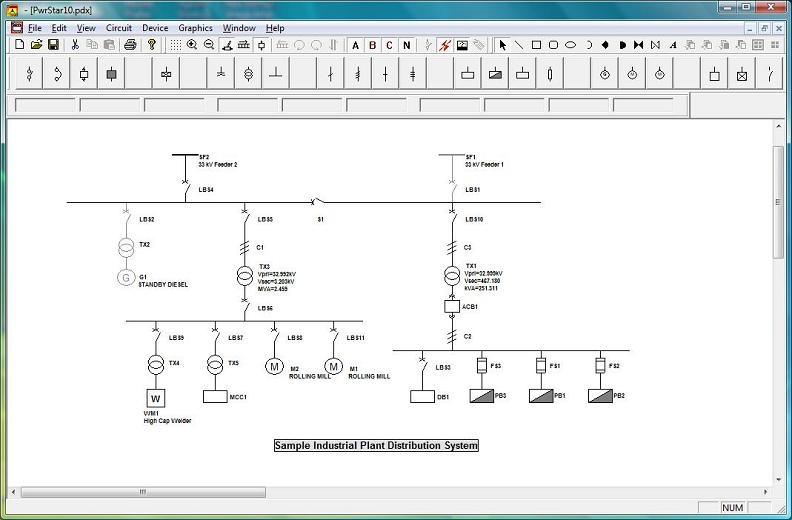
Highly versatile and easy to use, PowerStar was designed for use on most electrical design and analysis applications. Use it for commercial building services, industrial plants, distribution systems, power factor correction. Any project where you need to know voltage, current, kw, kva or kvar on any and all parts of the circuit.
Save time on circuit calculation, most especially laborious combinations of line to neutral, line to line and unbalanced three phase calculations as well as wye to delta current and voltage transformations where transformers are involved.
A list of some of the capabilities of PowerStar:
* Complete device information includes node voltages, voltage drops, current, kW, kVA and kVAr flow.
* Evaluate the effects of disconnected devices and branches on the rest of the circuit.
* Calculate three-phase, line to neutral and line to line load flow.
* Click on symbol to display or edit device rating and other properties.
* Mouseover any symbol to display electrical data.
* Highlight devices with overcurrent, kVA/kW overload, over/undervoltage.
* Print or plot to any Windows compatible printer or plotter.
* Cut, copy and paste devices and circuit sections to the Windows clipboard.
* Use graphics to annotate and add legends, title blocks, logos to the single line diagram.
About PowerStar
This Math & Scientific Tools program is available in English. It was last updated on 29 September, 2026. PowerStar is compatible with the following operating systems: Windows.
The company that develops PowerStar is Megasys Software. The latest version released by its developer is 3.2.
The download we have available for PowerStar has a file size of 7.3 MB. Just click the green Download button above to start the downloading process. The program is listed on our website since 2011-10-29 and was downloaded 0 times. We have already checked if the download link is safe, however for your own protection we recommend that you scan the downloaded software with your antivirus. Your antivirus may detect the PowerStar as malware if the download link is broken.
How to install PowerStar on your Windows device:
- Click on the Download button on our website. This will start the download from the website of the developer.
- Once the PowerStar is downloaded click on it to start the setup process (assuming you are on a desktop computer).
- When the installation is finished you should be able to see and run the program.
Program Details
System requirements
Download information
Pricing
Version History
version 3.2
posted on 2011-10-29
Improved user interface, more symbols, detailed sample circuits, bug fixes.
version 1.20
posted on 2009-09-08
New Release
Disclaimer
External Download
We do not host PowerStar on our servers. We did not scan it for viruses, adware, spyware or other type of malware. This app is hosted by the software publisher and passed their terms and conditions to be listed there. We recommend caution when installing it.
The external download link for PowerStar is provided to you by apps112.com without any warranties, representations or guarantees of any kind, so access it at your own risk.
If you have questions regarding this particular app contact the publisher directly. For questions about the functionalities of apps112.com contact us.
